The Best Audio Interfaces for Home Recording
Quick answer
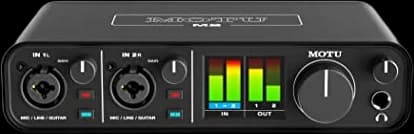
The MOTU M2 is the best all-around audio interface for most home studios: clean, high-gain preamps and genuinely stable low-latency drivers, all for around $199.
SlowHum may earn a commission when you buy through our links. Affiliate disclosure
A home studio needs one solid audio interface more than a second microphone. Here is how to pick one that will not bottleneck either.
Updated October 1, 2026 · 7 min read
Key takeaways
- Preamp gain matters more than sample rate for most vocals: a dynamic mic needs 55dB-plus of clean gain, which budget interfaces do not always provide.
- Every interface here is a 2-in/2-out USB-C design for one or two sources; step up in channel count only once you need more inputs.
- Direct monitoring and loopback let you hear yourself with near-zero latency and route computer audio back out for streaming, so check both before buying.
- Driver stability, not spec-sheet numbers, is the most common complaint in home-studio forums; established brands with mature drivers cause fewer dropouts.
At a glance
Best budget
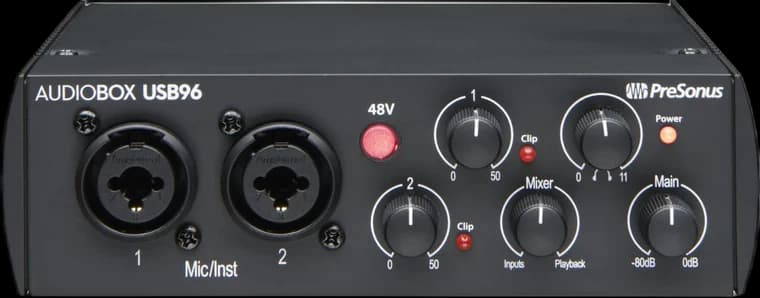
PreSonus AudioBox USB 96 25th Anniversary Audio InterfaceA first interface on the smallest budget
- Inputs
- 2 combo XLR/instrument
- Mic preamp gain
- Up to 35 dB
Trade-off: Least preamp gain of any interface here
Best overall
MOTU M2 USB-C Audio InterfaceMost home studios building a long-term setup
- Inputs
- 2 combo XLR/TRS
- Preamp gain
- Up to 60 dB
Trade-off: No built-in analog color or DSP effects
Best-known and most supported
Focusrite Scarlett 2i2 4th Gen USB-C Audio InterfaceBeginners who want the most tutorials and support
- Inputs
- 2 combo XLR/TRS
- Preamp gain
- Up to 69 dB
Trade-off: Preamps rated slightly behind the SSL 2 MKII and MOTU M2 in comparisons
Best for character
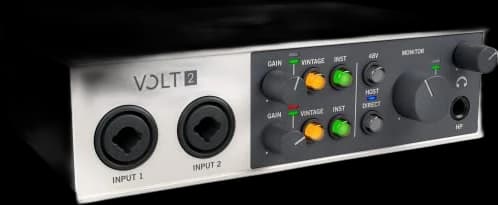
Universal Audio Volt 2 USB Audio InterfaceSingers who want an analog-modeled preamp option
- Inputs
- 2 combo XLR/TRS
- Preamp gain
- Up to 55 dB
Trade-off: Slightly less clean gain than the M2 or SSL 2 MKII
Best preamps
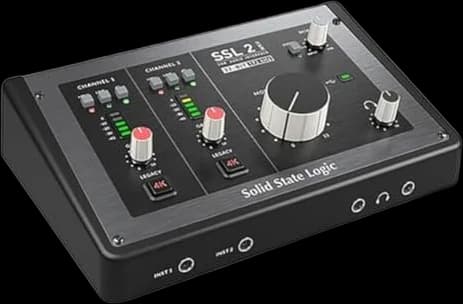
Solid State Logic SSL 2 MKII USB Audio InterfaceAnyone who prioritizes preamp quality above all else
- Inputs
- 2 combo XLR/TRS
- Preamp gain
- 64 dB range
Trade-off: Fewer streaming and loopback routing options than the M2
Best monitoring controls
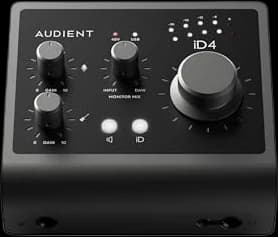
Audient iD4 MKII USB-C Audio InterfaceMusicians who want console-style monitor control
- Inputs
- 1 combo XLR/line, 1 instrument
- Preamp gain
- Up to 58 dB
Trade-off: Only one mic input, unlike the dual-mic interfaces here
| Pick | Best for | Price* | |
|---|---|---|---|
| A first interface on the smallest budget Trade-off: Least preamp gain of any interface here | $95 | Buy on Amazon → |
| Most home studios building a long-term setup Trade-off: No built-in analog color or DSP effects | $200 | Buy on Amazon → |
Best-known and most supported Focusrite Scarlett 2i2 4th Gen USB-C Audio Interface★ 4.6 (2,641 Amazon ratings) | Beginners who want the most tutorials and support Trade-off: Preamps rated slightly behind the SSL 2 MKII and MOTU M2 in comparisons | $225 | Buy on Amazon → |
| Singers who want an analog-modeled preamp option Trade-off: Slightly less clean gain than the M2 or SSL 2 MKII | $199 | Buy on Amazon → |
| Anyone who prioritizes preamp quality above all else Trade-off: Fewer streaming and loopback routing options than the M2 | $200 | Buy on Amazon → |
| Musicians who want console-style monitor control Trade-off: Only one mic input, unlike the dual-mic interfaces here | $180 | Buy on Amazon → |
* Prices are approximate and may vary. Please check the latest price on Amazon.
An audio interface is the one piece of home-recording gear that touches every signal on its way into your computer, which makes it a worse place to cut corners than the microphone plugged into it. The six interfaces below are all compact 2-in/2-out USB-C designs built for one or two sources at a time, a singer and a guitar, or a podcaster and a guest, spanning about $95 to $225.
Every one of these supplies the 48V phantom power a condenser microphone needs and connects over USB-C to Mac or Windows. Where they differ is preamp gain, driver stability, and workflow features like loopback and monitor mixing.
01 · Best budget
PreSonus AudioBox USB 96 25th Anniversary Audio Interface
Two combo inputs, MIDI and zero-latency monitoring for under $100, with modest preamp gain as the trade-off.
PreSonus gives the AudioBox USB 96 two combo mic/instrument inputs, two balanced line outputs, a headphone output and MIDI in and out, with 24-bit/96 kHz converters and a Mix knob that blends what you are playing with computer playback without latency. It runs on USB bus power, so there is no power supply to carry. The catch is gain: PreSonus specifies 35 dB of adjustable mic gain, which is enough for most condenser microphones but thin for a low-output dynamic mic like the SM58. It also has no loopback routing, so dedicated streaming setups should look further up this list.
Strengths
- + Lowest price of any interface here
- + MIDI in and out, which some pricier picks lack
- + Zero-latency Mix knob for monitoring
Trade-offs
- − Least preamp gain of any interface here
- − No loopback for streaming
- Inputs
- 2 combo XLR/instrument
- Mic preamp gain
- Up to 35 dB
- Max resolution
- 24-bit/96kHz
- Dynamic range
- 105 dB (A-weighted)
- MIDI
- In and out
- Power
- USB bus-powered
4.3 out of 5 from 3,169 Amazon ratings
Amazon’s summary of its reviews: Customers find the audio interface easy to set up for beginners, with a relatively steep but brief learning curve, and appreciate its solid build quality. The sound quality receives mixed feedback, with some praising it while others report crackling and popping sounds. Functionality and value for money also get mixed reviews, with some saying it works well and consider it a good purchase, while others report it doesn't work well and isn't worth the price. The software receives mixed feedback, with some appreciating the included software while others note it doesn't come with the advertised software. Compatibility is a concern, with several customers reporting it's not compatible with GarageBand.
What buyers praise
- ease of use — 78% positive of 46 mentions
- build quality — 84% positive of 19 mentions
What buyers complain about
- functionality — 47% negative of 105 mentions
- sound quality — 51% negative of 67 mentions
- value for money — 41% negative of 59 mentions
02 · Best overall
MOTU M2 USB-C Audio Interface
Best-in-class converters and stable drivers, plus a full-color meter display most rivals skip.
MOTU rates the M2's preamps at 60 dB of gain with a -129 dB equivalent input noise figure, and its ESS Sabre32 converters give it a 120 dB dynamic range that reviewers repeatedly flag as unusual for the price. Home-studio forums consistently rate its drivers among the most stable in this class, with round-trip latency low enough for real-time monitoring through a DAW rather than relying only on hardware monitoring. Its full-color LCD shows input and output levels at a glance, a rare feature under $250, and it includes loopback for streaming. The trade-off is a plainer feature set, with no onboard analog color like the SSL 2 MKII offers.
Strengths
- + Very clean, high-gain preamps
- + Stable, well-regarded drivers
- + Full-color level-metering display
Trade-offs
- − No built-in analog color or DSP effects
- − Headphone output is less powerful than some rivals
- Inputs
- 2 combo XLR/TRS
- Preamp gain
- Up to 60 dB
- EIN
- -129 dB
- Dynamic range
- 120 dB
- Loopback
- Yes
4.6 out of 5 from 1,565 Amazon ratings
Amazon’s summary of its reviews: Customers find the audio interface works well with Windows 11 and Ableton Live, offering amazing sound quality with clean guitar signals and good value for the price. The interface receives positive feedback for its inputs, with one customer noting it can handle both dynamic and cardioid mics. While some customers praise its instant plug-and-play usability, others report compatibility issues with Windows. Additionally, customers disagree on the noise level, with some reporting ultra-low noise while others experience loud pre-amps. Moreover, several customers report reliability issues, with the device starting to malfunction within a month of use.
What buyers praise
- quality — 86% positive of 150 mentions
- functionality — 73% positive of 131 mentions
- sound quality — 76% positive of 90 mentions
- value for money — 86% positive of 63 mentions
What buyers complain about
- compatibility — 47% negative of 34 mentions
03 · Best-known and most supported
Focusrite Scarlett 2i2 4th Gen USB-C Audio Interface
The best-selling home studio interface, updated with more gain and clip-safe recording.
The Scarlett 2i2 remains the interface most beginners are pointed toward, and the 4th generation raises preamp gain to 69 dB with new Auto Gain and Clip Safe features that automatically set input level and catch surprise peaks. Its market share means an enormous body of tutorials, plugin bundles, and troubleshooting threads exist specifically for it, a real advantage for a first-time buyer stuck on a setup problem. Home-recording communities are split on whether its preamps beat the SSL 2 MKII or MOTU M2 on pure transparency, with several threads rating it a notch below both. It remains a safe, well-supported choice rather than the highest-spec one.
Strengths
- + Largest tutorial and plugin ecosystem
- + Auto Gain simplifies level-setting for beginners
- + Widely regarded as reliable
Trade-offs
- − Preamps rated slightly behind the SSL 2 MKII and MOTU M2 in comparisons
- − No loopback on the base 2i2
- Inputs
- 2 combo XLR/TRS
- Preamp gain
- Up to 69 dB
- Max resolution
- 24-bit/192kHz
- Dynamic range
- 120 dB
- Extras
- Auto Gain, Clip Safe, Air mode
4.6 out of 5 from 2,641 Amazon ratings
Amazon’s summary of its reviews: Customers find the audio interface delivers amazing sound quality and provides good value for money, with intuitive controls and compatibility with various devices. They appreciate the included software, with one customer noting it comes with both ProTools intro license and Ableton Lite. The interface receives positive feedback for its versatility, with one review highlighting its suitability for guitars, microphones, and music production duties. However, several customers report issues with noise, including humming/static noise and constant beeps and buzzing.
What buyers praise
- sound quality — 70% positive of 60 mentions
- value for money — 72% positive of 46 mentions
- controls — 71% positive of 35 mentions
- versatility — 85% positive of 33 mentions
What buyers complain about
- connectivity — 55% negative of 42 mentions
04 · Best for character
Universal Audio Volt 2 USB Audio Interface
Adds a switchable vintage tube-preamp emulation that plain interfaces at this price do not offer.
The Volt 2 pairs a clean, modern preamp path with a switchable Vintage mode modeled on Universal Audio's own 610 tube preamp, adding harmonic warmth and gentle compression at the flip of a switch instead of in a plugin afterward. Universal Audio rates its gain at 55 dB, and preamp gain and impedance auto-adjust depending on whether an XLR or quarter-inch plug is connected. It includes MIDI I/O, unusual at this price, and doubles as an interface for iPad and iPhone. It does not match the MOTU M2's raw dynamic range on paper, so anyone chasing the cleanest possible signal may prefer the M2 or SSL 2 MKII instead.
Strengths
- + Switchable vintage tube-preamp character
- + MIDI in/out included
- + Works with iPad and iPhone
Trade-offs
- − Slightly less clean gain than the M2 or SSL 2 MKII
- − Vintage mode colors the signal, which is not always what a mix needs
- Inputs
- 2 combo XLR/TRS
- Preamp gain
- Up to 55 dB
- Vintage mode
- Emulated 610 tube preamp
- MIDI I/O
- Yes
- Max resolution
- 24-bit/192kHz
4.6 out of 5 from 743 Amazon ratings
Amazon’s summary of its reviews: Customers find the audio interface to be one of the best options available, with superior sound quality and easy operation. They consider it worth the price and appreciate its dual inputs for XLR and 1/4 inch connections. However, setup experiences are mixed, with some finding it straightforward while others note it requires proper configuration. Moreover, the noise level and volume receive mixed feedback, with some customers reporting excessive noise and low volume levels.
What buyers praise
- quality — 90% positive of 71 mentions
- sound quality — 81% positive of 43 mentions
- value for money — 95% positive of 21 mentions
05 · Best preamps
Solid State Logic SSL 2 MKII USB Audio Interface
Console-grade preamps and an optional analog saturation mode from a legendary mixing-desk brand.
Solid State Logic built the SSL 2 MKII around the same philosophy as its mixing consoles: clean gain first, character second. Its preamps offer a 64 dB gain range with a 116.5 dB dynamic range, numbers that put it ahead of the Scarlett 2i2 on paper and that home-studio forums frequently cite as the best-sounding preamps under $300. A per-channel Legacy 4K switch adds a subtle harmonic boost modeled on SSL's 4000-series consoles, an optional color the M2 and Scarlett do not offer. It has fewer routing options than the M2's loopback-heavy design, so streamers running complex mixes may find the MOTU more flexible.
Strengths
- + Widely cited as the best preamps in this price class
- + Legacy 4K adds optional analog color
- + Dual headphone outputs
Trade-offs
- − Fewer streaming and loopback routing options than the M2
- − Slightly pricier than the Scarlett 2i2
- Inputs
- 2 combo XLR/TRS
- Preamp gain
- 64 dB range
- Dynamic range
- 116.5 dB
- EIN
- -130.5 dB
- Extra
- Legacy 4K analog enhancement
4.5 out of 5 from 205 Amazon ratings
Amazon’s summary of its reviews: Customers find this audio interface to be a reliable upgrade that works well and delivers professional-grade clarity. They appreciate its solid build quality, with one customer noting its industrial feel, and find it incredibly easy to plug and play. They like the sound quality, with one mentioning clean 32-bit vocal recordings, and consider it worth its price.
What buyers praise
- quality — 100% positive of 28 mentions
- sound quality — 91% positive of 23 mentions
- reliability — 87% positive of 15 mentions
06 · Best monitoring controls
Audient iD4 MKII USB-C Audio Interface
A Class A console preamp and genuinely useful monitor-mix controls in a compact desktop unit.
Audient builds the iD4 MKII around the same Class A microphone preamp design used in its mixing consoles, rated at up to 58 dB of gain with a 120 dB dynamic range. Its standout feature is monitor control lifted from a real console: a dedicated monitor mix knob and panning function that most interfaces at this price handle only through software. Two headphone outputs with independent mixes make it easier to record a singer and a second musician together. It is limited to one mic/line input and one instrument input, so it suits one vocalist and one instrument rather than a full band.
Strengths
- + Console-style hardware monitor mixing
- + Two independent headphone mixes
- + Class A mic preamp
Trade-offs
- − Only one mic input, unlike the dual-mic interfaces here
- − Limited to 96kHz versus 192kHz on several rivals
- Inputs
- 1 combo XLR/line, 1 instrument
- Preamp gain
- Up to 58 dB
- Dynamic range
- 120 dB
- Headphone outputs
- 2, independent mixes
- Max resolution
- 24-bit/96kHz
4.5 out of 5 from 1,474 Amazon ratings
Amazon’s summary of its reviews: Customers praise the audio interface's functionality, sound quality, and build quality with its solid metal enclosure, while also appreciating its slick design and very low noise levels. The interface is easy to set up, though some find it frustrating to use, and while many find it plug-and-play, others report compatibility issues. The reliability receives mixed feedback, with some saying it works great while others report it randomly stops working.
What buyers praise
- functionality — 87% positive of 39 mentions
- sound quality — 80% positive of 30 mentions
What buyers complain about
- reliability — 61% negative of 23 mentions
Preamp gain: the spec that actually matters for vocals
Preamp gain determines how much an interface can boost a quiet microphone signal before it reaches a usable recording level. A low-output dynamic mic like the Shure SM58 needs considerably more gain than a condenser to reach the same level, which is why gain range varies so much between these picks, from 35 dB on the PreSonus AudioBox USB 96 up to 69 dB on the Scarlett 2i2 4th Gen. If your microphone is a dynamic mic, prioritize an interface with more headroom; with a condenser, most of these will have gain to spare.
Latency, drivers, and why stable beats fast on paper
Latency, the delay between singing into a mic and hearing yourself through headphones, comes from both an interface's hardware and its software drivers. Manufacturers publish round-trip latency numbers, but home-studio forums consistently report that driver stability matters more day-to-day than the number on the spec sheet: an interface with slightly higher rated latency but mature, frequently updated drivers causes fewer dropouts than a newer or less-supported one.
Most interfaces here also offer direct monitoring, a hardware path that lets you hear yourself with effectively zero latency regardless of your computer's processing load.
Loopback and streaming
Loopback routes a computer's audio output back into the interface as a virtual input, so a podcast or livestream can mix a caller's voice, background music, and your own mic into one stream. The MOTU M2 includes it standard; some interfaces here, including the base Scarlett 2i2, do not include it without an add-on. If podcasting or streaming is the main use case rather than music, confirm loopback support before buying rather than assuming every 2-in/2-out interface includes it.
Analog color: plain and clean vs. built-in character
Most interfaces aim for the cleanest, most neutral preamp possible, so any tone-shaping happens later in software. Two picks here take a different approach: the SSL 2 MKII's Legacy 4K switch and the Universal Audio Volt 2's Vintage mode both add modeled analog saturation at the hardware stage, before the signal reaches a DAW. That is a genuine option, not an upgrade. A clean signal shaped afterward is more flexible than color baked in during recording, so treat these as a stylistic choice rather than a strictly better interface.
How the picks differ, and how to choose
On a strict budget, the PreSonus AudioBox USB 96 covers the basics, two combo inputs plus MIDI, for under $100. For most people building a lasting home setup, the MOTU M2 combines the cleanest gain, the most stable drivers, and useful metering in one box. If you specifically want the tutorials, forums, and plugin bundles built around the most common interface on the market, the Focusrite Scarlett 2i2 4th Gen is the safest, most-supported pick. Buyers chasing outright preamp quality should compare the SSL 2 MKII against the Audient iD4 MKII, both built around console-grade preamp designs, while anyone who wants a switchable vintage tone should look at the Universal Audio Volt 2.
What to skip
Skip interfaces from unfamiliar brands with no published gain, dynamic-range, or latency specs; long-running home-studio forum threads treat a missing spec sheet as a red flag in itself. Skip interfaces bundled only with a no-name microphone if the mic is not one you would buy on its own, since you are paying for a box you do not need. And skip anything advertised primarily on channel count if you only need two inputs; more preamps you do not use just adds cost and desk space.
Questions people ask
Do I need an audio interface if my microphone connects by USB?
No. A USB microphone has its own built-in interface, which is the whole point of buying one. An audio interface like the ones here is for XLR microphones, which need external phantom power and a preamp before they can plug into a computer.
How much preamp gain do I actually need?
It depends on the microphone. A dynamic mic like the Shure SM58 typically needs 55 to 60-plus dB of clean gain to reach a healthy recording level, while most condenser microphones need less. Check your mic's sensitivity rating against an interface's maximum gain before buying.
What is the difference between direct monitoring and monitoring through my computer?
Direct monitoring routes the incoming signal straight to your headphones in hardware, before it reaches your computer, so there is effectively no delay. Monitoring through your DAW instead sends the signal through your computer's processing first, which can introduce audible latency depending on buffer settings and system load.
Is a 2-in/2-out interface enough, or should I get more inputs?
For one vocalist recording alone, or a vocalist and one instrument, two inputs is plenty. Buy more channels only once you have a concrete reason, such as recording a full band live or running multiple mics on a drum kit, rather than buying capacity you will not use.
Does a more expensive interface make my recordings sound noticeably better?
Past a certain point, gains are subtle. The jump from no interface to a clean $100-200 one is dramatic; the jump from a $200 interface to a $600 one is much smaller and mostly shows up in preamp headroom and build quality, not obvious sound quality.
Sources
As an Amazon Associate, SlowHum earns from qualifying purchases, at no extra cost to you. Full disclosure.