The Best MIDI Keyboards
Quick answer
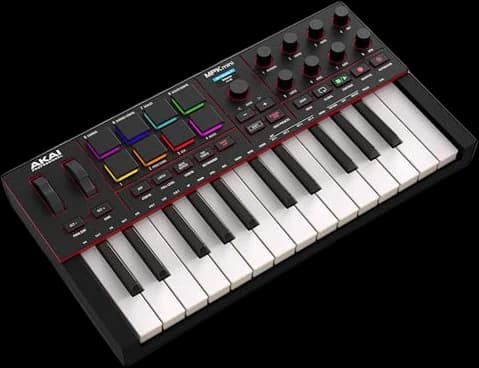
The Akai MPK Mini IV is the best all-around MIDI keyboard for most beginners: 25 mini keys, 8 pads, and a real software bundle for around $100. Producers who want a better keybed, more keys, or a specific DAW's native mapping should look at the step-up picks below.
SlowHum may earn a commission when you buy through our links. Affiliate disclosure
A MIDI keyboard is a dumb terminal for your software instruments — the right one just needs to get out of the way.
Updated October 22, 2026 · 7 min read
Key takeaways
- 25-key mini controllers cover beat-making and chord sketching; step up to 49 or 61 keys once you're playing real basslines and melodies.
- Pads and knobs matter as much as the keys — check pad count and whether the encoders are endless or turn-limited before buying.
- Every pick here ships with a DAW (usually Ableton Live Lite) and a slice of the maker's own instrument library, so weigh that into the price.
- Producer forums split the same way over and over: Arturia for keybed feel, Akai for pad feel. Try both in person if you can.
At a glance
Best overall
Akai Professional MPK Mini MK4A first controller that covers beats and basic keys
- Keys
- 25, velocity-sensitive mini keys
- Pads
- 8 backlit, MPC-style
Trade-off: Mini keys aren't a substitute for full-size ones
Best keybed at this size
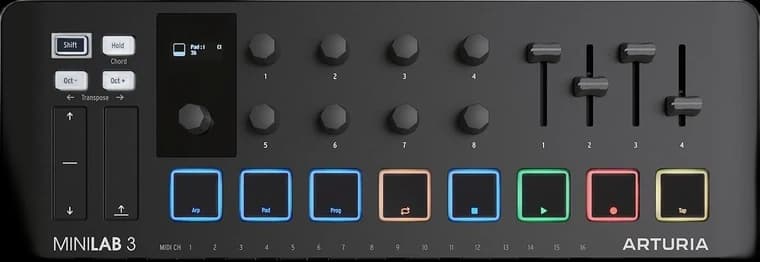
Arturia MiniLab 3Buyers who prioritize how the keys feel over pad count
- Keys
- 25, slim velocity-sensitive keys
- Pads
- 8, two banks (16 total)
Trade-off: Pads are smaller and less sensitive than Akai's
Best 37-key with sequencer and CV
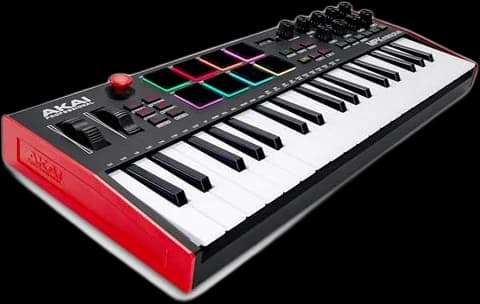
Akai Professional MPK Mini Plus 37-Key MIDI ControllerBeat-makers who want more keys and a sequencer that runs without a computer
- Keys
- 37, velocity-sensitive mini keys
- Pads
- 8 RGB MPC pads
Trade-off: Mini keys, not full-size
Best for Ableton Live
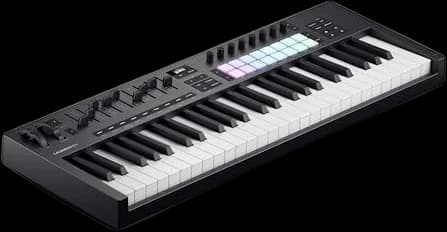
Novation Launchkey 49 MK4Ableton Live users who want hands-on clip and mixer control
- Keys
- 49, semi-weighted, synth-action
- Pads
- 16, velocity-sensitive RGB
Trade-off: 49 keys and a control surface make it bulkier to travel with
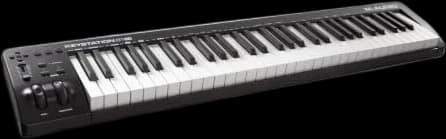
Best budget 61-key
M-Audio Keystation 61 MK3 USB MIDI ControllerFull-size keys without paying for pads, a screen or extra faders
- Keys
- 61, full-size, velocity-sensitive (semi-weighted per M-Audio)
- Controls
- Pitch and mod wheels, volume fader, transport and direction buttons
Trade-off: No pads or knobs
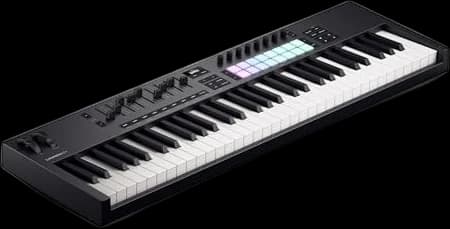
Best 61-key for Ableton
Novation Launchkey 61 MK4Ableton Live users who want a full five octaves and a full control surface
- Keys
- 61, semi-weighted
- Pads
- 16, velocity-sensitive RGB, polyphonic aftertouch
Trade-off: Needs a lot of desk space
| Pick | Best for | Price* | |
|---|---|---|---|
Best overall Akai Professional MPK Mini MK4 | A first controller that covers beats and basic keys Trade-off: Mini keys aren't a substitute for full-size ones | $99 | Buy on Amazon → |
Best keybed at this size Arturia MiniLab 3 | Buyers who prioritize how the keys feel over pad count Trade-off: Pads are smaller and less sensitive than Akai's | $119 | Buy on Amazon → |
Best 37-key with sequencer and CV Akai Professional MPK Mini Plus 37-Key MIDI Controller★ 4.5 (2,209 Amazon ratings) | Beat-makers who want more keys and a sequencer that runs without a computer Trade-off: Mini keys, not full-size | $139 | Buy on Amazon → |
Best for Ableton Live Novation Launchkey 49 MK4 | Ableton Live users who want hands-on clip and mixer control Trade-off: 49 keys and a control surface make it bulkier to travel with | $280 | Buy on Amazon → |
| Full-size keys without paying for pads, a screen or extra faders Trade-off: No pads or knobs | $229 | Buy on Amazon → |
| Ableton Live users who want a full five octaves and a full control surface Trade-off: Needs a lot of desk space | $330 | Buy on Amazon → |
* Prices are approximate and may vary. Please check the latest price on Amazon.
Most MIDI keyboards do the same basic job: turn key presses into note data your software instruments can use. What actually separates them is how the keys feel, how many pads and knobs you get for beats and sound tweaking, and how directly the hardware talks to your DAW. None of the keyboards below make a sound on their own — they're controllers, not synthesizers with their own speakers.
The picks here run from a $99 mini controller to a 61-key studio rig, chosen to cover the decision most beginners actually face: how many keys, how much control surface, and which software bundle tips the value in your favor.
01 · Best overall
Akai Professional MPK Mini MK4
The default beginner pick: small, cheap, and genuinely useful past the first month.
Akai lists 25 velocity-sensitive mini keys, 8 backlit MPC-style pads, 8 assignable 360-degree knobs, and a small color display, all over USB-C. The MK4 revision dropped the old 4-way joystick for a proper pitch/mod strip, which reviewers and Reddit's producer forums both flag as a real usability fix over the MK3. It comes with Akai's Studio Instrument Collection plus Ableton Live Lite 12 and over 1,000 presets. Skip it if you already know you want full-size or semi-weighted keys — the mini keybed is a compromise for portability, not a piano substitute. Its Amazon ratings are pooled with the previous MK3.
Strengths
- + Cheapest way into real production
- + Chord and scale modes help non-keyboardists
- + Pad feel is a step above most mini controllers
Trade-offs
- − Mini keys aren't a substitute for full-size ones
- − No faders
- Keys
- 25, velocity-sensitive mini keys
- Pads
- 8 backlit, MPC-style
- Knobs
- 8 assignable, 360-degree
- Connectivity
- USB-C, 5-pin MIDI out
- Software included
- Studio Instrument Collection, Ableton Live Lite 12
$119
Buy on Amazon02 · Best keybed at this size
Arturia MiniLab 3
Same footprint as the MPK Mini, better-regarded keybed, more software in the box.
Arturia's own spec sheet lists 25 slim keys, 8 pads across two banks (16 total), 8 knobs, 4 faders, and two capacitive touch strips for pitch and mod — faders are the feature that separates it from most keyboards this size. On Reddit's r/synthesizers and r/musicproduction threads, the recurring split is that the MiniLab's keybed and build quality edge out the MPK Mini, while Akai's pads edge out Arturia's. It ships with Analog Lab Intro (500 presets) and Ableton Live Lite. Skip it if finger-drumming is your main use case; the pads are smaller than dedicated pad controllers.
Strengths
- + Faders are rare at this price and size
- + Widely reported as the better keybed of the two mini rivals
- + 5-year warranty from Arturia
Trade-offs
- − Pads are smaller and less sensitive than Akai's
- − No MIDI in, only out
- Keys
- 25, slim velocity-sensitive keys
- Pads
- 8, two banks (16 total)
- Controls
- 8 knobs, 4 faders, 2 touch strips
- Connectivity
- USB-C, 5-pin MIDI out, 1/4" pedal input
- Software included
- Analog Lab Intro, Ableton Live Lite
03 · Best 37-key with sequencer and CV
Akai Professional MPK Mini Plus 37-Key MIDI Controller
Three octaves of mini keys, MPC pads, a built-in sequencer and CV/Gate for synths, for about $140.
The MPK Mini Plus stretches the MPK Mini to 37 mini keys, three full octaves, and adds things the 25-key models leave out. Akai lists 8 RGB MPC pads, 8 endless knobs, a transport section for DAW control, and a 64-step sequencer with one drum track and one melody or chord track, so you can sketch a pattern without opening a DAW. MIDI in and out plus CV/Gate outputs let it drive hardware synths and modular gear directly. It supports Native Instruments' NKS and lets you pick one of three Komplete 15 Select bundles, alongside MPC Beats. It holds 4.5 stars across more than 2,000 ratings. Skip it if you want full-size keys; these are the same mini keys as the MPK Mini.
Strengths
- + Standalone sequencer for sketching without a computer
- + CV/Gate and MIDI I/O for hardware synths
- + Three octaves in a still-portable size
Trade-offs
- − Mini keys, not full-size
- − Wider than the 25-key controllers
- Keys
- 37, velocity-sensitive mini keys
- Pads
- 8 RGB MPC pads
- Knobs
- 8 endless rotary
- Sequencer
- 64 steps, 1 drum and 1 melody/chord track
- Connectivity
- USB, MIDI in/out, CV/Gate
- Software included
- MPC Beats, choice of Komplete 15 Select bundle
$280
Buy on Amazon04 · Best for Ableton Live
Novation Launchkey 49 MK4
The closest thing to a native Ableton controller that isn't Ableton's own hardware.
Novation's listing puts the MK4 at 49 semi-weighted, waterfall-style keys, 16 velocity-sensitive RGB pads, 8 continuous encoders, and 9 faders, with an OLED display for feedback. In Ableton Live it maps directly to Session View, Drum Rack, and the mixer with no setup, and it also carries custom integrations for Logic, FL Studio, Cubase, Reason, Reaper, and Ardour. The box includes Ableton Live Lite, Cubase LE, and Novation's own Play instrument library. Skip it if you don't use one of its named DAWs — you'll still get generic MIDI, but you lose the whole point of the controller.
Strengths
- + Zero-setup mapping for Ableton, Logic, FL Studio and more
- + Faders plus encoders, unusual at this price
- + Four storable custom modes
Trade-offs
- − 49 keys and a control surface make it bulkier to travel with
- − Overkill if you only sketch chords
- Keys
- 49, semi-weighted, synth-action
- Pads
- 16, velocity-sensitive RGB
- Controls
- 8 encoders, 9 faders, OLED display
- Connectivity
- USB-C, 5-pin MIDI out
- Software included
- Ableton Live Lite, Cubase LE, Novation Play
05 · Best budget 61-key
M-Audio Keystation 61 MK3 USB MIDI Controller
Sixty-one full-size keys with transport buttons and a volume fader, and nothing you don't need.
The Keystation 61 MK3 is a keys-first controller: 61 full-size, velocity-sensitive keys that M-Audio describes as semi-weighted, pitch and mod wheels, octave buttons, a volume fader and transport and direction buttons for your DAW, with a sustain pedal input. It is bus-powered over USB, so there is no power supply to find. The box includes Ableton Live Lite, MPC Beats and AIR's Mini Grand, Velvet and Xpand!2 instruments. It is a long-running design, still sold new by Amazon, with 4.5 stars across more than 6,800 ratings. Skip it if pads or hands-on mixing controls matter to you; it has neither.
Strengths
- + Full-size 61 keys at a budget price
- + Bus-powered, nothing extra to plug in
- + Very large owner rating pool
Trade-offs
- − No pads or knobs
- − No display for feedback
- Keys
- 61, full-size, velocity-sensitive (semi-weighted per M-Audio)
- Controls
- Pitch and mod wheels, volume fader, transport and direction buttons
- Inputs
- Sustain pedal
- Connectivity
- USB bus-powered
- Software included
- Ableton Live Lite, MPC Beats, AIR Mini Grand, Velvet, Xpand!2
06 · Best 61-key for Ableton
Novation Launchkey 61 MK4
The Launchkey 49's controls with five octaves of semi-weighted keys.
The 61-key Launchkey MK4 carries the same control surface as the 49-key model above, with more keys: Novation lists 61 semi-weighted keys, 16 velocity-sensitive RGB pads with polyphonic aftertouch, 8 endless encoders, 9 faders and an OLED display, plus a 5-pin MIDI out. It maps directly to Ableton Live and carries custom integrations for Logic, FL Studio, Cubase, Reason, Reaper and Ardour, with scale and chord modes for non-keyboardists. The box includes Ableton Live Lite, Cubase LE, Novation Play and Komplete 15 Select. It holds 4.7 stars across about 200 ratings. Skip it if your desk can't take a 61-key board; the 49 does the same job in less space.
Strengths
- + Five octaves for two-handed parts
- + Deep, zero-setup DAW mapping
- + Faders, encoders and aftertouch pads in one board
Trade-offs
- − Needs a lot of desk space
- − More than most beginners need
- Keys
- 61, semi-weighted
- Pads
- 16, velocity-sensitive RGB, polyphonic aftertouch
- Controls
- 8 encoders, 9 faders, OLED display
- Connectivity
- USB-C, 5-pin MIDI out
- Software included
- Ableton Live Lite, Cubase LE, Novation Play, Komplete 15 Select
25, 49, or 61 keys: how much do you actually need
A 25-key mini controller (two octaves) is enough for programming beats, triggering samples, and sketching chords one hand at a time — most hip-hop and electronic producers never outgrow one. A 49-key controller gives you two full hands of range for basslines played against a melody, which matters once you're writing anything with real harmonic movement. A 61-key board is the point where you can play most piano parts without constantly shifting octaves.
The honest advice on r/musicproduction and r/synthesizers is consistent: buy the size that matches what you already play, not what you think you'll grow into. A 25-key controller that fits next to your laptop gets used; a 61-key board that lives on a stand in the corner often doesn't.
Key action: mini, synth-action, and semi-weighted
"Mini" keys (as on the MPK Mini, MPK Mini Plus and MiniLab 3) are narrower than piano keys, built for portability rather than playing technique. "Synth-action" full-size keys are full width but spring back quickly with no simulated hammer weight — standard on cheaper keyboard synths since the 1980s. "Semi-weighted" keys, used on the Launchkey MK4 and the Keystation 61 MK3, add resistance that approximates (without fully replicating) a piano's feel.
None of these are a substitute for a fully-weighted hammer-action digital piano if your main instrument is piano. They're built for producers layering parts in a DAW, not for practicing classical repertoire.
Pads and knobs: beat-making vs. sound design
Pads matter if you finger-drum or trigger samples; Akai's MPC-style pads have the strongest reputation for that specifically, a point that comes up unprompted in almost every Reddit thread comparing it to Arturia's controllers. Knobs and faders matter for real-time sound tweaking and mixing — the Launchkey MK4 adds nine faders and the MiniLab 3 four, where most mini controllers skip them for space.
If your main use is triggering drum samples, weight your decision toward pad quality. If it's sculpting synth patches or riding levels while you record, weight it toward faders and encoder count instead.
DAW integration: what "plug and play" actually means
Every keyboard here works as generic MIDI input in any DAW. The difference is whether the hardware also maps its knobs, faders, and transport buttons to your specific software without manual assignment. Novation's Launchkey line builds this specifically for Ableton Live (with secondary support for Logic, FL Studio, Cubase, and more), and Native Instruments' NKS standard, which the MPK Mini Plus and Launchkey MK4 both support, auto-maps to compatible plugins rather than to a DAW's mixer.
Check that your DAW is on the specific integration list before assuming a "DAW integration" feature will actually do anything for you.
The software bundle is part of the price
Every pick here ships with a DAW (usually a Lite or LE edition) and at least one virtual instrument or preset library. The MPK Mini Plus adds a choice of three Komplete 15 Select bundles alongside MPC Beats, and the Launchkey MK4 boards add Cubase LE, Novation Play and Komplete 15 Select alongside Ableton Live Lite. Factor that in before comparing keyboards on hardware specs alone: a slightly pricier controller with a genuinely useful software bundle can be the better deal.
How the picks differ
Start with the Akai MPK Mini MK4 if you want the cheapest reasonable entry point and don't yet know your workflow. Choose the Arturia MiniLab 3 over it if keybed feel and faders matter more to you than pad feel, or the Akai MPK Mini Plus if you want three octaves, a built-in sequencer and CV for hardware synths. Move up to the Novation Launchkey 49 MK4 if you produce in Ableton Live and want hands-on clip control, or to the Launchkey 61 MK4 for the same controls across five octaves. And the M-Audio Keystation 61 MK3 is for anyone who wants full-size keys and doesn't care about pads or a screen.
Questions people ask
Do I need a MIDI keyboard to make music, or can I use my computer keyboard?
You can program notes with a mouse or your computer's QWERTY keys in most DAWs, and plenty of producers start that way. A MIDI keyboard is faster for playing chords and melodic ideas in real time and adds velocity sensitivity, which a computer keyboard can't replicate. It becomes worth buying once typing in notes starts slowing you down.
Does a MIDI keyboard make sound by itself?
No. Every keyboard on this list sends MIDI data to software instruments running on your computer, or to a synthesizer if you connect one via 5-pin MIDI. Without a DAW, a virtual instrument, or an external synth on the other end, pressing a key does nothing.
Is 25 keys really enough to get started?
For beat-making, chord sketches, and most electronic production, yes — it's the size most producers on Reddit's production forums recommend for a first controller. If you already play piano and write parts that span more than about two octaves at once, size up to 49 or 61 keys instead.
What's the difference between a MIDI keyboard and a synthesizer?
A MIDI keyboard, sometimes called a controller, has no sound engine of its own — it only sends performance data. A synthesizer generates its own sound and can be played standalone. Several controllers here (the Launchkey MK4 boards and the MPK Mini Plus) can also control external synths over 5-pin MIDI, but they still don't make sound on their own.
Do I need to buy the same brand as my DAW?
No DAW requires a matching-brand controller. But some keyboards, like Novation's Launchkey line, are built around deeper integration with specific software, so check whether your DAW is on the manufacturer's supported list before assuming you'll get one-touch mixer and clip control.
Sources
- MPK Mini IV | Akai Professional (product specifications)
- MiniLab 3 | Arturia (product overview and specifications)
- Launchkey 49 MK4 | Novation (product page)
- Launchkey 61 MK4 | Novation (product page)
- MPK Mini Plus | Akai Professional (product page)
- Amazon — M-Audio Keystation 61 MK3 listing
- Keyboard Krush: best MIDI keyboard controllers roundup
As an Amazon Associate, SlowHum earns from qualifying purchases, at no extra cost to you. Full disclosure.