The Best Drum Machines
Quick answer
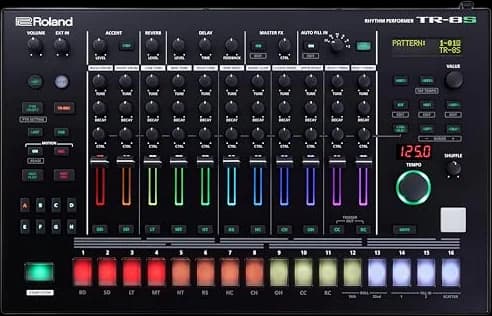
The Roland TR-8S is the best all-around drum machine for most people moving past a phone app: modeled classic drum sounds, sample import and a real step sequencer in one box. Budget-first buyers should start with the Korg Volca Drum or the Teenage Engineering PO-12.
SlowHum may earn a commission when you buy through our links. Affiliate disclosure
A drum machine is a sequencer with opinions about rhythm baked in — the right one matches how you actually want to program a beat.
Updated October 22, 2026 · 7 min read
Key takeaways
- Sampling machines play back audio you load in; synthesis machines generate drum sounds electronically and let you shape them with knobs.
- Standalone machines like these run without a computer; that's the whole appeal over a plugin, but it also means learning a new hands-on workflow.
- Battery power and a built-in speaker (Volca Drum, MPC Sample) matter more than spec sheets if you actually want to use the thing away from a desk.
- The Korg Volca Drum is digital synthesis, not analog: it trades classic drum-machine kits for a wider, stranger range of percussion.
At a glance
Best overall
Roland TR-8S Rhythm PerformerProducers who want one drum machine to grow into for years
- Tracks
- 11 instrument parts + 1 trigger track
- Sequencer
- 16 steps per variation, 8 variations (A-H) per pattern
Trade-off: Most expensive pick by a wide margin
Best portable
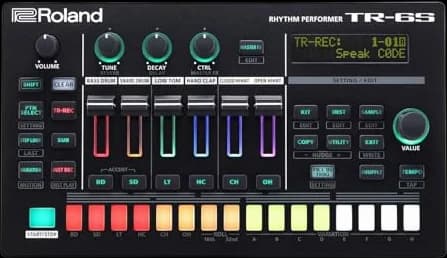
Roland TR-6S Rhythm PerformerBuyers who want TR-series sounds in a battery-powered box
- Tracks
- 6 instrument tracks
- Sequencer
- 16 steps per variation, 8 variations + 2 fill-ins
Trade-off: Only 6 tracks vs. the TR-8S's 11
Best analog / most hands-on
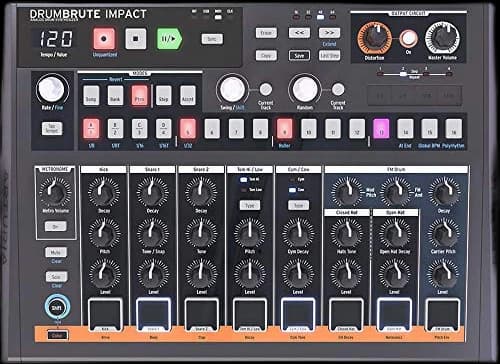
Arturia DrumBrute ImpactBuyers who want every parameter on a physical knob, no menus
- Voices
- 10 pure analog (kick, 2 snares, hi/lo tom, cowbell, cymbal, 2 hats, FM)
- Sequencer
- Up to 64 patterns, up to 64 steps each, 4 banks
Trade-off: Knob positions aren't saved with patterns
Best ultra-budget, battery and speaker
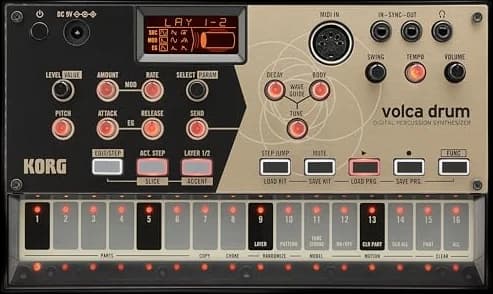
Korg Volca Drum Digital Percussion SynthesizerA first drum machine to learn sequencing basics cheaply
- Parts
- 6 (digital synthesis, 2 oscillators each)
- Effect
- Waveguide resonator
Trade-off: No USB or MIDI out
Best pocket-sized
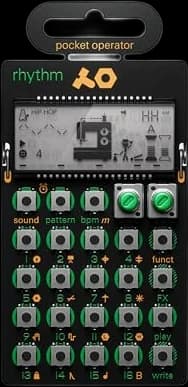
Teenage Engineering Pocket Operator PO-12 RhythmAn impulse-buy price that still teaches real sequencing
- Sounds
- 16 tweakable synthesized drum sounds
- Sequencer
- 16-step, 16 chainable patterns
Trade-off: No MIDI or USB, sync is audio-jack only
Best sampler step-up
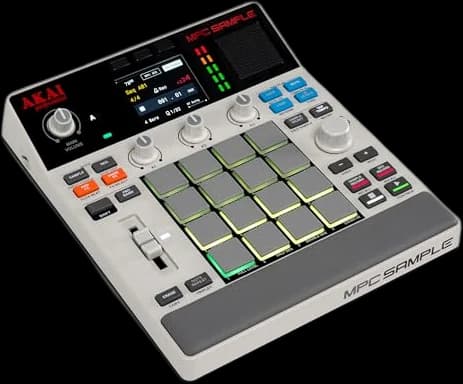
Akai Professional MPC Sample Portable SamplerRecording, chopping and sequencing your own samples
- Pads
- 16 MPC pads
- Display
- 2.4-inch color
Trade-off: Sample-based, no built-in drum synthesis
| Pick | Best for | Price* | |
|---|---|---|---|
Best overall Roland TR-8S Rhythm Performer | Producers who want one drum machine to grow into for years Trade-off: Most expensive pick by a wide margin | $870 | Buy on Amazon → |
Best portable Roland TR-6S Rhythm Performer | Buyers who want TR-series sounds in a battery-powered box Trade-off: Only 6 tracks vs. the TR-8S's 11 | $470 | Buy on Amazon → |
Best analog / most hands-on Arturia DrumBrute Impact | Buyers who want every parameter on a physical knob, no menus Trade-off: Knob positions aren't saved with patterns | $299 | Buy on Amazon → |
Best ultra-budget, battery and speaker Korg Volca Drum Digital Percussion Synthesizer★ 4.4 (681 Amazon ratings) | A first drum machine to learn sequencing basics cheaply Trade-off: No USB or MIDI out | $147 | Buy on Amazon → |
Best pocket-sized Teenage Engineering Pocket Operator PO-12 Rhythm | An impulse-buy price that still teaches real sequencing Trade-off: No MIDI or USB, sync is audio-jack only | $59 | Buy on Amazon → |
| Recording, chopping and sequencing your own samples Trade-off: Sample-based, no built-in drum synthesis | $399 | Buy on Amazon → |
* Prices are approximate and may vary. Please check the latest price on Amazon.
A drum machine does two things: it generates or plays back drum sounds, and it sequences them into a pattern you can loop, tweak, and perform live. Some, like the Arturia DrumBrute Impact (analog) and the Korg Volca Drum (digital), synthesize their sounds electronically from scratch. Others, like the Akai MPC Sample, play back audio you load or record yourself. Most beginners don't need to decide that up front — the picks below are ordered by price and workflow, not by which technology is "better."
Every machine here runs standalone, without a laptop, which is the main reason to buy hardware over a drum plugin in the first place.
$870
Buy on Amazon01 · Best overall
Roland TR-8S Rhythm Performer
The most complete standalone drum machine here, at a price that reflects it.
Roland's spec sheet lists 11 instrument parts plus a dedicated trigger track, a 16-step TR-REC sequencer with 8 variations per pattern, and ACB (Advanced Circuit Behavior) modeling of the 808, 909, 707, 727, 606, and CR-78. It also holds 72 FM tones and 300-plus samples, with room to import your own via SD card. Eight individual analog outputs make it mixer-friendly in a real studio. Skip it if you just want to sketch beats casually — the depth here is wasted on a first drum machine bought to noodle with occasionally.
Strengths
- + Deepest sound engine of any pick here
- + Individual outs make it a real studio tool
- + Sample import means it isn't locked to factory sounds
Trade-offs
- − Most expensive pick by a wide margin
- − No AC-free portable power option
- Tracks
- 11 instrument parts + 1 trigger track
- Sequencer
- 16 steps per variation, 8 variations (A-H) per pattern
- Sound sources
- ACB modeling (808/909/707/727/606/CR-78), 72 FM tones, 300+ samples
- Sample import
- WAV/AIFF via SD card, ~600 seconds total
- Outputs
- 8 individual 1/4" TRS outs
$470
Buy on Amazon02 · Best portable
Roland TR-6S Rhythm Performer
The TR-8S's sound engine shrunk to fit a bag and run on AA batteries.
Roland's specs list 6 instrument tracks with the same 16-step, 8-variation TR-REC sequencer as the TR-8S, plus 2 fill-in patterns, running the same ACB modeling, 72 FM tones, and 300-plus samples in a 705-gram body. It runs on 4 AA batteries (about 4.5 hours on alkaline) or USB bus power, and doubles as a USB audio/MIDI interface. Skip it if you need more than 6 simultaneous instrument tracks — that's the real trade-off against the larger TR-8S, not sound quality.
Strengths
- + Same core TR sound engine as the flagship TR-8S
- + Genuinely pocket/bag-portable and battery-run
- + Doubles as a USB audio interface
Trade-offs
- − Only 6 tracks vs. the TR-8S's 11
- − No individual outs
- Tracks
- 6 instrument tracks
- Sequencer
- 16 steps per variation, 8 variations + 2 fill-ins
- Sound sources
- Same ACB modeling, FM tones and sample library as TR-8S
- Power
- 4 AA batteries (~4.5 hrs) or USB bus power
- Weight
- 705g / 1 lb 9 oz
$299
Buy on Amazon03 · Best analog / most hands-on
Arturia DrumBrute Impact
Ten pure-analog drum voices with no menu diving anywhere in the workflow.
Arturia lists 10 analog drum voices (kick, two snares, hi and low toms, cowbell, cymbal, closed and open hi-hats, plus an FM voice), a sequencer holding up to 64 patterns at up to 64 steps each across 4 banks, and per-instrument "Color" controls that add overdrive and harmonic bite. Reddit's r/synthesizers regularly recommends it as one of the most hands-on machines available, with commenters specifically praising the polyrhythm-capable sequencer. The recurring complaint in the same threads is that knob positions aren't recalled when you switch patterns. Skip it if you want a computer-free sampler — this is pure synthesis, no sample import.
Strengths
- + Every control is a dedicated physical knob or button
- + Individual outs and deep sync options for a hardware setup
- + Polyrhythm sequencing that beginners can hear results from immediately
Trade-offs
- − Knob positions aren't saved with patterns
- − No sample playback, analog synthesis only
- Voices
- 10 pure analog (kick, 2 snares, hi/lo tom, cowbell, cymbal, 2 hats, FM)
- Sequencer
- Up to 64 patterns, up to 64 steps each, 4 banks
- Sound shaping
- Per-instrument "Color" overdrive/harmonic controls
- Connectivity
- USB MIDI, multiple sync options (MIDI, Clock, DIN24/48)
- Outputs
- Individual outs for kick, snares, hats, FM voice
04 · Best ultra-budget, battery and speaker
Korg Volca Drum Digital Percussion Synthesizer
Six parts of digital drum synthesis, a 16-step sequencer, batteries and a speaker, for about $150.
Korg's spec sheet lists six parts, each built from two oscillators, a pitch modulator and an amp envelope, run through a waveguide resonator that adds metallic and tonal ringing to the hits. It is digital synthesis, not analog, so it covers stranger, more varied percussion than a classic drum-machine kit. The 16-step sequencer stores 16 patterns, with Active Step, a slice function for rolls and 16 accent levels. It runs on six AA batteries (Korg quotes about 10 hours on alkaline) and the listing notes a built-in speaker, so it makes sound with nothing else attached. It holds 4.4 stars across more than 600 ratings. Skip it if you want classic 808 and 909 sounds; the Roland TR machines are built around those.
Strengths
- + Battery power and a built-in speaker for anywhere use
- + Wide, unusual sound range for the price
- + Slice and accent functions add real expression
Trade-offs
- − No USB or MIDI out
- − Not built around classic drum-machine kits
- Parts
- 6 (digital synthesis, 2 oscillators each)
- Effect
- Waveguide resonator
- Sequencer
- 16 steps, 16 patterns, Active Step, slice
- Power
- 6 AA batteries (about 10 hrs alkaline) or optional AC adapter
- Connectivity
- MIDI in, Sync in/out (3.5mm)
05 · Best pocket-sized
Teenage Engineering Pocket Operator PO-12 Rhythm
Genuinely tiny, genuinely cheap, and still a real step sequencer underneath the toy-like shell.
Teenage Engineering's specs list 16 tweakable synthesized drum sounds, a 16-step sequencer with 16 chainable patterns, 16 punch-in effects, and parameter locks for per-step sound tweaks. It runs on 2 AAA batteries for about a month of regular use and syncs to other Pocket Operators or gear over a 3.5mm audio cable. It has no MIDI, no USB, and a tiny LCD that some buyers find hard to read. Skip it if you need MIDI sync with a DAW or other modern gear; its sync method is audio-based and specific to the Pocket Operator ecosystem.
Strengths
- + Cheapest real drum machine in this guide by a wide margin
- + Pocket-sized and genuinely durable for its price
- + Parameter locks add real depth per step
Trade-offs
- − No MIDI or USB, sync is audio-jack only
- − Tiny display and buttons take some getting used to
- Sounds
- 16 tweakable synthesized drum sounds
- Sequencer
- 16-step, 16 chainable patterns
- Effects
- 16 punch-in effects, parameter locks
- Power
- 2 AAA batteries, ~1 month active life
- Sync
- 3.5mm audio jam sync (no MIDI/USB)
06 · Best sampler step-up
Akai Professional MPC Sample Portable Sampler
The MPC sampling workflow in a battery-powered box with a speaker and microphone built in.
Akai's listing describes a portable sampler, sequencer and effects unit with 16 MPC pads, a 2.4-inch color display, a rechargeable battery, a built-in speaker and an internal microphone, so you can sample a sound and turn it into a beat without a computer. It ships with more than 100 factory kits, a chop mode for slicing samples, and four effect slots drawing on 60 effect types. It is new for 2026 and already the best-selling audio sampler on Amazon, at 4.7 stars across more than 450 ratings. MIDI runs over 1/8-inch jacks, so 5-pin gear needs an adapter that is not included. Skip it if you want built-in drum synthesis rather than sample playback.
Strengths
- + Samples from its own microphone, no computer needed
- + Battery and speaker for anywhere use
- + Best seller in its category
Trade-offs
- − Sample-based, no built-in drum synthesis
- − MIDI DIN adapter sold separately
- Pads
- 16 MPC pads
- Display
- 2.4-inch color
- Power
- Rechargeable lithium-ion battery
- Built-in
- Speaker and microphone
- Content
- 100+ factory kits, 60 effect types
- Connectivity
- USB-C audio/MIDI, 1/4-inch line in/out, MIDI in/out via 1/8-inch (adapter not included)
Sampling vs. synthesis: two different ways to make a kick drum
A synthesis-based machine like the DrumBrute Impact or Volca Drum builds each drum sound from oscillators, filters, and envelopes, the same building blocks as a synthesizer. You get a fixed set of drum types (kick, snare, hats, and so on) but can reshape each one with knobs. A sample-based machine like the MPC Sample instead plays back short audio recordings, so it can trigger literally any sound you load onto it — but it can't synthesize a new tone from scratch.
Roland's TR-series machines (the TR-8S and TR-6S) do both: modeled versions of classic drum circuits, plus the ability to import your own samples for the sounds those circuits can't cover.
Sequencer workflow: steps, patterns, and variations
Nearly every machine here uses some version of a step sequencer, where you place hits on a numbered grid (typically 16 steps per bar). What differs is how patterns chain together: the TR-8S and TR-6S use Roland's variation system (A through H) to build longer arrangements from one pattern, while the DrumBrute Impact supports full pattern banks you can switch between live and the MPC Sample uses Akai's MPC sequencer. The PO-12's 16 chainable patterns are the simplest version of the same idea, built for spontaneous jamming rather than structured song arrangement.
Standalone vs. needs-a-computer
Every machine in this guide is standalone — it runs on its own power (AC, USB, or batteries) and doesn't need a DAW to make sound. That's the entire appeal over a drum plugin: you're forced into a hands-on workflow with physical knobs instead of a mouse and screen. The trade-off is that saving, backing up, and deeply editing patterns is usually slower than in software. If you already produce entirely inside a DAW, weigh whether you actually want a second, separate workflow before buying hardware.
Portability and power
The TR-6S, Volca Drum, PO-12 and MPC Sample all run on batteries, and the Volca Drum and MPC Sample add a built-in speaker so they need nothing else to be heard. The TR-8S and DrumBrute Impact are AC/USB-powered desktop units built for a studio setup rather than a backpack. If you want something to bring to a friend's place or use away from an outlet, start with the battery-powered options.
What to skip
Skip anything marketed as a "drum machine app" bundled with a cheap MIDI controller — those are software instruments wearing a drum machine's branding, not standalone hardware. Also be wary of used analog drum machines from the 1980s and 1990s sold as investment pieces; parts and repairs for genuinely vintage units (as opposed to the modern reissues and clones covered here) can be expensive and hard to source.
How the picks differ
Start with the Teenage Engineering PO-12 or Korg Volca Drum if your budget is under $200 and you just want to learn step sequencing. Move to the Arturia DrumBrute Impact for analog sound and knob-per-function control. Choose the Roland TR-6S if you want Roland's classic drum sounds in a genuinely portable, battery-powered box, or the Roland TR-8S if you want the full-featured version for a permanent studio setup. Pick the Akai MPC Sample specifically if you want to record and sequence your own samples rather than built-in synthesized sounds.
Questions people ask
Do I need a drum machine if I already produce in a DAW?
No — every drum machine here can be replicated in software with enough plugins. People choose hardware for the hands-on workflow: physical knobs, no screen, and the constraints that come from not being able to infinitely undo. It's a workflow preference, not a capability gap.
What's the difference between a drum machine and a groovebox?
The terms overlap heavily. A drum machine is generally built around percussion sounds and a step sequencer. A groovebox (a term Roland and others use) usually adds melodic or bass sequencing tracks alongside drums, aiming to be a more complete standalone production tool rather than drums only.
Can a drum machine sync with my computer or DAW?
Most can, but the connection method varies. The TR-8S, TR-6S, and DrumBrute Impact all support USB and/or MIDI sync with a DAW. The Volca Drum takes MIDI in and analog sync, with no USB; the MPC Sample adds USB-C audio and MIDI. The PO-12 has no MIDI at all — it syncs only with other Pocket Operators and compatible gear over an audio cable.
Is analog or digital better for a first drum machine?
Neither is objectively better; they sound and behave differently. Analog machines like the DrumBrute Impact tend to have warmer, less precise sounds and simpler per-voice controls. Digital and sample-based machines like the Volca Drum, the MPC Sample or the TR-series' sample-import mode offer more flexibility and precision, at the cost of some of that analog character.
Is a cheap drum machine like the PO-12 worth it, or should I save for something bigger?
If you're not sure you'll stick with hardware sequencing, a $59 Pocket Operator is a low-risk way to find out. It teaches the same core step-sequencer concepts as pricier machines. Producers who know they want sample import, individual outs, or a bigger sound palette are better served saving for the DrumBrute Impact or TR-6S instead.
Sources
- TR-8S | Roland (product specifications)
- TR-6S | Roland (product specifications)
- DrumBrute Impact | Arturia (product overview and specifications)
- 5 Best Drum Machines for Beginners in 2026 | The Drum Ninja
- Specifications | volca drum - Digital Percussion Synthesizer | KORG (USA)
- Amazon — Akai Professional MPC Sample listing
As an Amazon Associate, SlowHum earns from qualifying purchases, at no extra cost to you. Full disclosure.